eMudhra: A CA Private Key Was Just 156
eMudhra: A CA Private Key Was Just 156
Last week I kept seeing headlines that the private keys of eMudhra, an Indian certificate authority, had been “cracked in under a second”. I wanted to understand the details. My understanding was that you cannot work out a private key from its public key, so I did not see how anyone could recover a CA’s private key, let alone in under a second.
So I read through the Mozilla bug thread, built a small toy CA on my laptop, and pulled one of the affected eMudhra certificates to recover the key myself. These are my notes, starting from how certificates work, so they should be easy to follow even if you have never looked at this before. After that I go through how a CA’s key is made and used, and what went differently at eMudhra at each step. The scripts behind every output in this post are on GitHub.
Sending a secret to someone you have never met
The simplest kind of encryption uses one key. The same key locks and unlocks, like the key to your front door. This is called symmetric encryption. It is fast, and it is what actually protects your data once a secure connection is set up.
The problem is getting that key to the other side. If you want to talk to a server on the other side of the world, you cannot just send it the key, because anyone who sees the message on the way gets the key too.
Asymmetric encryption gets around this with a pair of keys. The private key stays with its owner and is never sent anywhere. The public key can be given to anyone. Something locked with the public key can only be opened with the matching private key.
A physical version of this is a padlock. Say you want to send Alice a letter that only she can read.
- Alice buys a padlock and keeps the only key.
- She mails you the open padlock.
- You put your letter in a box, snap the padlock shut and mail the box back. Now only Alice can open it.
It does not matter who sees the padlock on the way, seeing it does not help anyone open the box. But say Eve works at the sorting office.
- Eve takes Alice’s padlock out of the envelope and puts her own open padlock in instead.
- You receive a padlock and assume it is Alice’s. You lock your letter with it and mail the box back.
- Eve intercepts the box, opens it with her own key and reads the letter. Then she locks it with Alice’s padlock and sends it on.
Neither you nor Alice notices anything. This is a man-in-the-middle attack.
The internet works the same way. When you open a website, your traffic goes through your Wi-Fi router, your ISP and several other networks before it reaches the server. Anyone on that path, a compromised router at a coffee shop or a malicious ISP, can play Eve. If they answer your browser with their own public key, the browser cannot tell it apart from the real one by looking at it. A public key is just a big number.
So the lock itself is fine. What is missing is proof of whose padlock it is. That is what signatures and certificates are for.
Signatures
Key pairs also give us signatures, which are a separate thing from encryption. The private key signs some data, and anyone with the matching public key can check the signature. Only the holder of the private key can produce a signature that passes the check.
You do not sign the data directly. You first run it through a hash function like SHA-256, which turns data of any size into a short fixed-length fingerprint. Change a single byte of the data and the fingerprint changes completely. Then:
- The signer signs the hash with their private key and attaches the signature to the data.
- The receiver hashes the data they received.
- The receiver checks the signature against that hash using the signer’s public key. It either passes or fails.
If it passes, two things are true. The signature was made with the matching private key, and the data has not changed since it was signed.
There are two common kinds of key pairs, RSA and elliptic curve. They use different maths, but from the outside they work the same way: sign with the private key, check with the public key. eMudhra’s keys were elliptic curve keys, and I go into how those work later in the post.
Certificates
A signature tells you that whoever holds a particular private key signed something. It does not tell you who that is. If Eve sends her own public key and signs with her own private key, the check passes. It is the same padlock problem.
The fix is to have someone the browser already trusts vouch for the key. That someone is a certificate authority (CA).
Before you open any website, your device already holds a list of CA public keys, called a trust store. It comes with your operating system, and some browsers, like Chrome and Firefox, bring their own. Which CAs get into that list is decided by the root programs run by Mozilla, Google, Apple and Microsoft. This is what gets around the padlock problem. These public keys arrive with your device or a software update, not over the network, so Eve never gets a chance to swap them on the way.
A certificate is a small document that says “the public key for myblog.com is this”, with a start and expiry date, signed by a CA.
The CA’s job is to check that you actually control myblog.com before it signs. Say you buy myblog.com and want https://myblog.com to work.
- Your server generates a key pair. The private key stays on the server.
- You send the CA a certificate signing request (CSR) with the domain name and your public key.
- The CA checks that you control the domain. Let’s Encrypt does this with a protocol called ACME, which asks you to put a random token at a URL on the site or in a DNS record.
- The CA signs the name and public key with its own private key. The result is your certificate.
Usually certbot or your hosting provider does all of this for you.
When someone visits myblog.com, your server sends them this certificate. The browser checks the CA’s signature on it using the CA’s public key
from its trust store. If the check passes, the browser knows a CA it trusts has confirmed that this public key belongs to myblog.com.
In practice the key in the trust store is not the one that signs your certificate. That root key is kept offline and only used now and then to sign intermediate CA certificates. The intermediates sign website certificates day to day. So there are three layers:
Its certificate ships in browsers and operating systems, in the trust store. Only used now and then to sign intermediates.
Signs website certificates every day. All eight of eMudhra's weak keys were at this layer.
Sent to every visitor, whose browser checks the signatures back up to the root.
Whoever holds an intermediate’s private key can sign a certificate for any domain, and clients that trust the root will accept it as long as it passes the other checks, which an attacker can arrange. All eight eMudhra keys in this incident were intermediate keys. Six were for website certificates. The other two were for code signing, which is the same idea applied to software: the OS checks a signature on an app to see who made it.
Going back to Eve, once certificates are in place she has three options, and none of them work.
- She sends her own public key in a certificate she wrote herself. No trusted CA signed it, so the browser shows a warning.
- She forges a CA’s signature on that certificate. Without the CA’s private key she cannot make a signature that passes.
- She forwards the site’s real certificate. The browser accepts it, but the server also has to prove it holds the private key for that certificate, and Eve does not have it.
The only way through is to hold a CA’s private key. Those are generated inside hardware that is built to never let them out, and a 384 bit elliptic curve key cannot be worked out from its public key. eMudhra’s turned out to be the number 156.
What happens when you open this blog
I wanted to see all of this on a real visit. This blog is hosted on GitHub Pages, so I used it as the example.
When you open https://shbhmrzd.github.io, the browser looks up the address in DNS, connects to a GitHub server and asks for the site. The server
replies with its certificate chain. You can see exactly what it sends with one curl command, which works with the curl that comes with
macOS and recent Windows:
curl -sI -w '%{certs}' -o /dev/null https://shbhmrzd.github.io/ | grep -E "^(Subject|Issuer)"
curl lists the certificates starting from the site’s own. This is what it showed me on 23 October 2026, drawn here from the root down:
Already on your device. The server does not send it.
Let's Encrypt's newer root. This copy is signed by X1, so devices that only trust X1 still accept it.
The intermediate that signs website certificates day to day.
Covers shbhmrzd.github.io. Valid from 30 September to 29 December 2026.
The browser checks each signature with the public key of the certificate above it, until it reaches a root it already trusts. Certificates are public, anyone can download this chain like I just did, so it is the signatures that make it trustworthy.
I ran the same checks by hand with Python’s cryptography library. Then I tried two things that should fail: changing github.io to evilxx.io
inside the site certificate (the “leaf”), and checking it against the wrong parent.
check leaf  with YR1's public key    : VALID
check YR1   with Root YR's public key: VALID

same leaf, but 'github.io' changed to 'evilxx.io' in the body: INVALID
leaf checked with the wrong parent (Root YR instead of YR1)  : INVALID
Changing one word breaks the signature, and so does moving the certificate under a different CA. These certificates use RSA keys rather than elliptic curve keys, but signing and checking work the same way.
After the chain, the browser checks that the name matches (*.github.io covers shbhmrzd.github.io), that today falls between the start and
expiry dates, and that the certificate is not on its list of revoked certificates. Browsers mostly do not ask the CA about this on every visit,
they ship their own lists, like Chrome’s CRLSet and Firefox’s OneCRL. Browsers like Chrome also
require proof that the certificate was published in the CT logs,
public append-only lists of issued certificates run by Google, Cloudflare and others.
Then comes the step that stops Eve from just forwarding the real chain. The server signs a hash of the handshake so far, which includes a fresh
random value from the browser, with the *.github.io private key. The browser checks that signature with the public key in the site certificate.
A copied certificate is useless without that private key.
The two sides had already worked out a shared symmetric session key from values swapped in their first two messages. All of these checks confirm who is on the other end of that key. Once they pass, the page arrives encrypted with it.
Where a CA key fits in
The name and date checks only look at what the certificate says, and whoever writes a certificate can put anything there. Telling a real
certificate from a fake one comes down to the signatures. If someone holds an
intermediate’s private key, they can write their own certificate saying “this is shbhmrzd.github.io, and here is my public key”, sign it with the
intermediate’s key, and attach the intermediate’s real certificate. The chain check passes because the signature really was made with that key.
The handshake check passes because the certificate contains the attacker’s own public key, and they hold the matching private key.
A leaked intermediate key lets someone skip the CA’s domain check for any domain, not only the CA’s own customers.
This is the whole visit as a click-through, a simplified version of a TLS 1.3 handshake using the real chain from above. Switch to the hypothetical attack to see which checks would have passed for someone holding eMudhra’s G3B key before browsers blocked it.
A detour into elliptic curve keys
Every step below involves an elliptic curve key, so it helps to have a picture of what one is. I had to go back to basics for this part.
Think of a board game. There is a fixed starting square called G, the same for everyone, and a fixed rule for jumping from one square to the
next. The private key is a number d. The public key is the square you land on after d jumps from G, written Q = d × G. That square
is what goes into the certificate.
- Going forward is easy. The jump rule is a way of combining any two squares, not only of stepping forward by one. If you combine the square you reach after 5 jumps with itself, you land on the square for 10 jumps. So to make 1,000 jumps you don’t need 1,000 moves. You go to 2 jumps, then 4, then 8 and so on, adding a few single jumps along the way, and you get there in 14 moves. Even a 384 bit number only takes a few hundred.
- Going backward is hard. Looking at
Q, you cannot tell how many jumps it took. The squares are not laid out in a row, and each jump lands somewhere that looks random. The simplest way to search fordis to count: jump once and compare, jump again and compare, and keep going.
For P-384, the curve eMudhra’s intermediates used, d is picked from 1 to about 3.9 × 10^115. No computer could count that far. There are
smarter methods than counting one by one, but the best known ones still need around 2^192 steps, which is also far too many. All of this assumes
d is picked at random from that whole range. If d is 156, counting finds it on the 156th jump, which is what happened with eMudhra’s keys and
what my script further down does.
Where the curve comes in
You don’t need this part for the rest of the post, but this is what the squares and jumps actually are. The squares are points on an elliptic
curve, the points that satisfy y² = x³ + ax + b. A single jump is adding G to where you are, and combining two squares means adding two points:
draw a line through them, find where it crosses the curve a third time, and flip that point across the x-axis. A straight line crosses this kind of
curve in three places, so there is a third point to land on. (To combine a point with itself, you use the line that just touches the curve
at that point.) The one exception is a vertical line, which has no third crossing. For that case the curve has one extra point, called the
point at infinity, which works like zero.
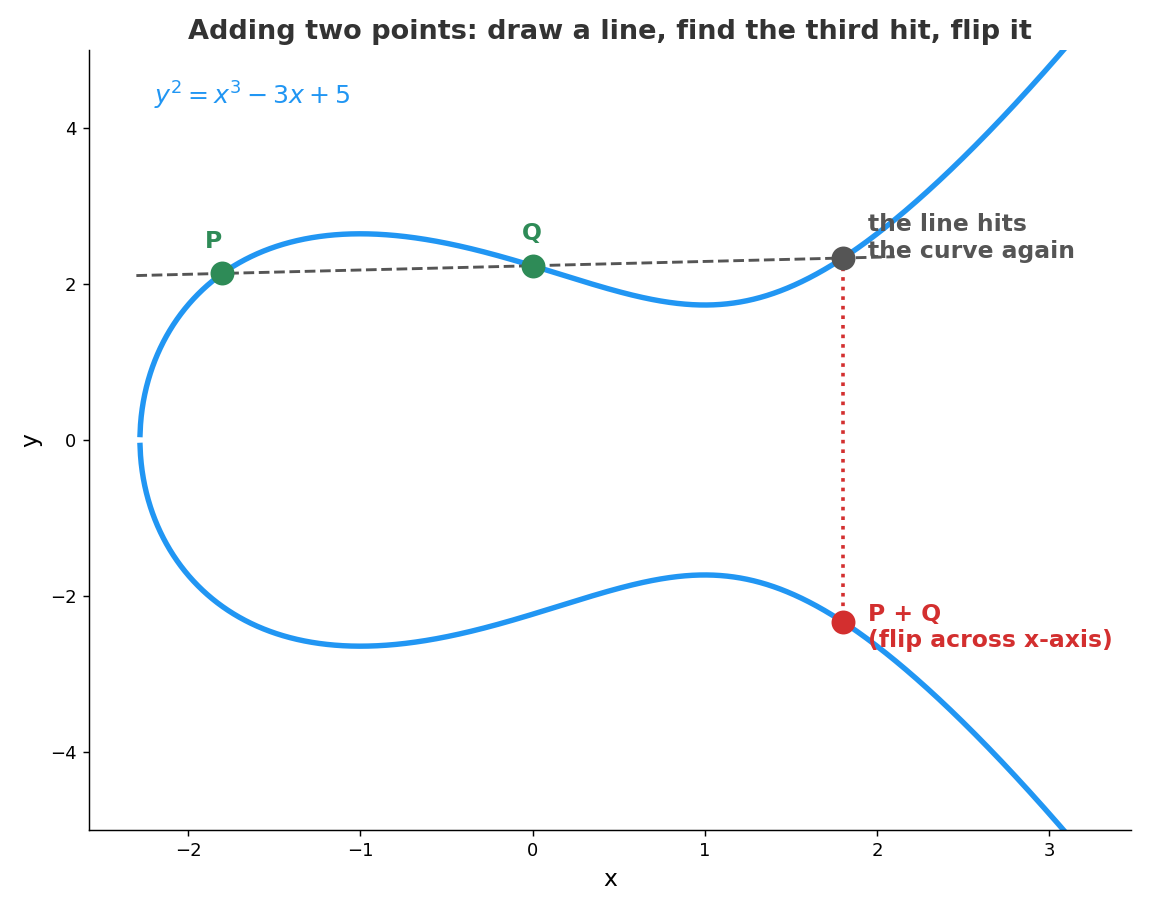
Real curves do this arithmetic with whole numbers that wrap around at a large prime, the way the hours on a clock wrap around at 12. The smooth curve turns into scattered dots, and the jumps land all over the place:
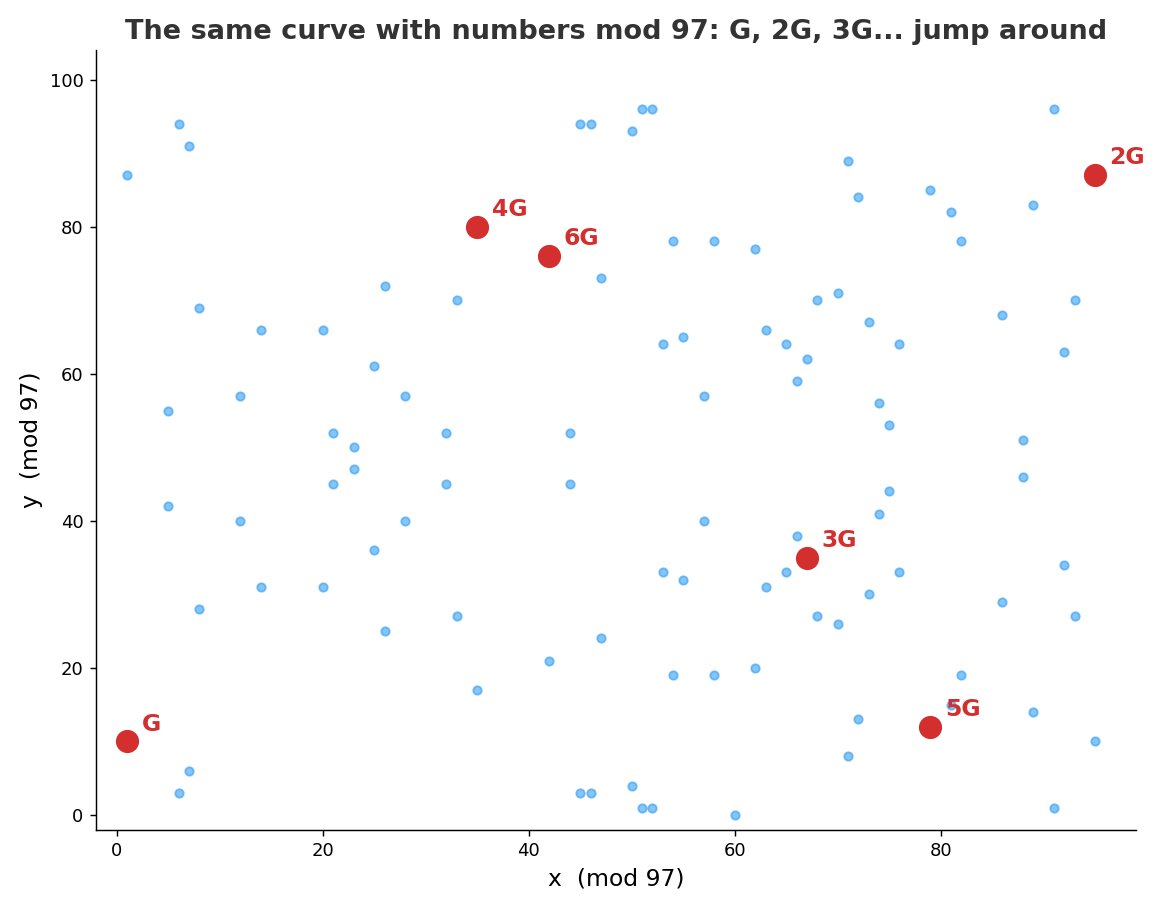
This is a toy version where the numbers wrap around at 97. Starting from G, the jumps visit 105 different points, then land on the point at infinity, and the next jump brings them back to G.
So the cycle has 106 positions.
If I gave you 5G from this picture, you would have to count jumps from G to find out it was 5. With 105 points that takes a moment, but a
P-384 curve has about 3.9 × 10^115 of them.
Step 1: Generating the key
What usually happens
A P-384 private key is 48 bytes (384 bits) of randomness. Here is one I generated for my toy CA, a throwaway key that nothing trusts:
priv:
    8a:7a:39:5e:03:27:96:35:b3:f9:c5:2d:88:7c:ec:40:
    1e:f6:4f:03:2f:63:40:a7:bf:de:28:aa:75:3c:b6:34:
    8c:2b:62:a4:33:c1:67:7a:88:00:da:1d:bc:aa:01:68
Anyone can work out the public key from this and sign with it. That does not matter, because nothing trusts it. A leaked key is only a problem when something trusts its public key, which is exactly what made eMudhra’s 156 dangerous.
For a website, certbot or your hosting provider generates a key on your server. A real CA generates its keys inside an
HSM (hardware security module), a device built to generate keys and never let them out in plain form.
The rules for this come from the CA/Browser Forum Baseline Requirements, a rulebook every publicly trusted CA has to follow. It says SHALL for things a CA must do and SHOULD for things it is only recommended to do. Section 6.1.1.1 covers how a CA’s own keys are generated.
For a root key, the CA must hold a key ceremony. It follows a written script, an independent auditor watches (or the whole thing is filmed), and the auditor then writes a report confirming the script was followed.
For an intermediate key that a CA makes for its own use, the rules are lighter. The script and the auditor or video are only recommended, and no report is needed. eMudhra’s keys fall under this, because the intermediates and the root that signed them all belong to eMudhra. G3B is owned by eMudhra BV and the root by eMudhra Technologies, two parts of the same company.
But someone on the bug pointed out that Sectigo, a different CA, also signed these keys, so that devices trusting Sectigo would accept them too. This is called a cross-sign, covered in Step 2. From Sectigo’s side eMudhra is an outside company, and keys belonging to an outside company fall under the strict rules, so they argued the strict rules should have applied here too.
Whichever rules apply, a few things are always required. The CA must generate the key inside the hardware its policy says it uses, keep a log of how it was generated, and be able to show the key was made the way its procedures describe. Those records are what people on the bug are now asking eMudhra to share.
One thing I found interesting is in the next section, 6.1.1.3. When a website owner sends a CA a CSR, the CA must reject it if the key is known to be weak. The best known case is a 2008 bug in Debian’s copy of OpenSSL. A change to the code had removed almost all of the randomness from key generation, so for about two years every key made on Debian or Ubuntu was one of only around 32,000 possible keys. The forum keeps a list of all of them, and CAs must check incoming keys against it. That is the same kind of problem as eMudhra’s, a key picked from a tiny set, but these checks are not mentioned for the CA’s own keys.
What happened at eMudhra
eMudhra generated a batch of 24 intermediates at a key ceremony on 30 April 2025. They came in three series (A, B and C), each with RSA and P-384 keys for four purposes. The eight affected keys are all the P-384 keys in the B and C series.
As per eMudhra’s preliminary explanation on the bug, the proper keys were generated on the HSM as expected. Then an approved one-off change was added to the ceremony to test exporting the keys (wrap and unwrap), and a flaw in that script created a second, weaker set of keys on the HSM.
Mozilla’s analysis says the eight affected keys “all used integers less than 256” and were “effectively all-zeroes apart from the last byte”.
This is what such a key looks like, using d = 156:
priv:
    00:00:00:00:00:00:00:00:00:00:00:00:00:00:00:00:
    00:00:00:00:00:00:00:00:00:00:00:00:00:00:00:00:
    00:00:00:00:00:00:00:00:00:00:00:00:00:00:00:9c
0x9c is 156. For a random pick, the chance of landing below 256 is about 255 / 3.9 × 10^115, roughly 6.5 × 10^-114.
This is not bad luck, something in the key generation went wrong.
What exactly went wrong is still open. Several people on the bug pointed out that an HSM’s normal key generation does not produce a number below 256 by itself, so either a value was fed into the HSM or a key was created from supplied key material. As of 23 October eMudhra had not answered those questions.
Step 2: Getting the intermediate signed
What usually happens
An intermediate gets its certificate the same way a website does, with a CSR. The difference is that the CA’s own root signs it, and the certificate is marked as a CA that is allowed to sign other certificates.
A CA can also get its intermediate cross-signed by another, older CA. The other CA’s root signs the same public key, so devices that trust the older root also accept certificates from the intermediate.
What happened at eMudhra
The weak keys had labels similar to the strong ones, and eMudhra says the weak ones were picked by mistake to create the CSRs. eMudhra’s root signed them, and the CSRs went to Sectigo for cross-signing.
You can see both on crt.sh. The EM DV TLS CA - G3B intermediate has one certificate issued by
emSign Root TLS CA - G3 with a start date of 30 April 2025, the ceremony date, and one issued by Sectigo’s AAA Certificate Services root
with a start date of 14 May 2025. Chrome and Mozilla had already dropped that Sectigo root, but Apple and Microsoft still trusted it.
Step 3: Using the key day to day
What usually happens
Once the intermediate is live, the CA uses its key for two things. The first is signing website certificates, after checking that the requester controls the domain.
The second is signing the CRL (certificate revocation list), a published list of certificates the CA has cancelled before their expiry date. Clients check the CRL’s signature against the intermediate certificate’s public key before trusting the list.
What happened at eMudhra
This is where there was an early warning. In May and June 2025, the CRLs for the six TLS intermediates were failing signature checks, and this was reported in its own bug. eMudhra says the CRLs were first signed with the original strong keys, which did not match the public keys in the certificates, so the signatures were invalid. They were then re-signed with the weak keys, which did match, and the errors went away. The mismatch between the keys on the HSM and the keys in the certificates was not looked into further, and the weak keys stayed in place for about 17 months.
Step 4: The browser checks the chain
What usually happens
This is the same chain check as on this blog. Each certificate’s signature is checked with the public key of the one above it, up to a trusted root.
What happens with a weak intermediate key
To see what the browser makes of a weak key, I built a toy CA with OpenSSL: a root, a normal intermediate, and a second intermediate whose private
key I set to 156, the same value as one of eMudhra’s. I signed a myblog.com certificate with each intermediate and asked OpenSSL to verify both
chains against the toy root.
myblog.crt: OK
myblog-weak.crt: OK
Both chains pass. None of these checks can tell whether the private key was generated securely, so a weak key looks exactly like a strong one to the browser.
The part that surprised me was this. Since Q = d × G and everyone uses the same G, my toy intermediate with d = 156 has exactly the same
public key as eMudhra’s real EM DV TLS CA - G3B. I compared the two in code and they match byte for byte. Anyone could do the same and, with
the real G3B certificate, sign a certificate for any domain that chains to eMudhra’s trusted root.
Recovering the key and proving it is correct
All of this is only a problem if someone can find d. Certificates are public, so I downloaded the real EM DV TLS CA - G3B from
crt.sh and tried every value below 256.
import sys, time
from cryptography import x509
from cryptography.hazmat.primitives.asymmetric import ec
from cryptography.hazmat.primitives import hashes

cert = x509.load_pem_x509_certificate(open(sys.argv[1], "rb").read())
pub = cert.public_key().public_numbers()
print("Subject:", cert.subject.rfc4514_string())
print("Public key x:", hex(pub.x)[:20] + "...")

start = time.perf_counter()
for d in range(1, 256):
    candidate = ec.derive_private_key(d, ec.SECP384R1()).public_key().public_numbers()
    if (candidate.x, candidate.y) == (pub.x, pub.y):
        print(f"Found private key d = {d} after {d} tries in {(time.perf_counter()-start)*1000:.2f} ms")
        key = ec.derive_private_key(d, ec.SECP384R1())
        msg = b"signed with the recovered key"
        sig = key.sign(msg, ec.ECDSA(hashes.SHA384()))
        cert.public_key().verify(sig, msg, ec.ECDSA(hashes.SHA384()))
        print("Signature made with d verifies against the certificate's public key: OK")
        break
else:
    print("No key below 256")
Output:
Subject: CN=EM DV TLS CA - G3B,O=eMudhra BV,C=NL
Public key x: 0xe79ed9c04a9773c473...
Found private key d = 156 after 156 tries in 235.53 ms
Signature made with d verifies against the certificate's public key: OK
There are two checks in that code that prove 156 is really the key.
The first is the comparison itself. Q = d × G is deterministic, the same d always gives the same point. Every d from 1 to n - 1
(where n is the number of points reachable from G) lands on a different point, so if 156 × G equals the public key in the certificate,
then 156 is the private key. No other number in range gives the same point.
The second check is practical. I signed a message with d = 156 and verified the signature using only the public key from the certificate.
If it passes, whoever made that signature had the private key. This is the same proof a server gives at the end of the handshake, and the same thing
an attacker would do to sign a fake certificate.
The researcher, who goes by Wayne on the bug, found the weak keys while running a test corpus against the certificates in CCADB, the shared
database that browser root programs use to track CA certificates. Mozilla then recovered the keys on its own. Its comment on the bug mentions
using either baby-step giant-step (one of the smarter methods than counting one by one mentioned earlier) or just generating the first
256 P-384 keys, which is what my script does.
What happened after the report
The response was fast once the report came in. All times are UTC.
- 17 October, 18:05: Wayne emails the Chrome, Mozilla, Apple and Microsoft root programs and eMudhra, with proof that he holds all eight keys.
- 17 October, 19:45: Chrome blocks the intermediates through CRLSet, its own list of blocked certificates, without users needing an update.
- 17 October, 22:59: Mozilla finishes blocking all eight in Firefox through OneCRL, less than 3 hours after it received the report.
- 18 October: eMudhra revokes all eight. Sectigo revokes its cross-signs the next day.
- 20 October: other people have recovered the keys independently, some publicly. Mozilla removes trust in the root with an emergency update to NSS (the certificate library Firefox uses) and Chrome commits to doing the same. eMudhra stops issuing from everything under that root.
- 22 October: eMudhra says it will leave the SSL/TLS certificate business.
G3B’s certificate names its issuer as emSign Root TLS CA - G3, but the root browsers trusted these intermediates through, and the one they removed,
is emSign ECC Root CA - G3. Removing a root takes every certificate under it down too. eMudhra estimated about 30,000 certificates had to move to
another root, and Chrome’s count from the CT logs shows almost all of them came through Internet2’s InCommon intermediates. Chrome’s root removal
was due to reach all users on 27 October.
I had assumed CT would have stopped an attacker even with the key, since Chrome rejects certificates that were not publicly logged. It would not have. An attacker can submit their forged certificate to the CT logs themselves and get the proof Chrome asks for. What CT does is make the forgery public, so the domain owner or anyone watching the logs can spot it. Google says no TLS certificates under these intermediates had been logged before it blocked them, and it has since made sure the logs reject them.
eMudhra says only one of the eight, EM DV TLS CA - G3C, was ever put into production, and that none of them issued certificates to customers.
Whether anyone else found the keys in those 17 months is not known.
Browsers block these now. Other software that carries its own copy of the trusted roots (Python’s certifi, Node.js, Rust’s webpki-roots,
containers, embedded devices) often has no way to block a single intermediate. If it still trusts eMudhra’s root, it stays exposed until it gets
the update that removes it.
Going through the steps side by side, what bothered me most was the CRL failure in 2025. The keys used to sign those lists did not match the certificates. Switching keys made the signatures verify, but it left the mismatch unexplained for another 16 months. A simple test on the keys themselves, such as rejecting a private key with 47 leading zero bytes, would have caught all eight.
Sources
- Mozilla Bugzilla 2083449. eMudhra: Private key compromise of Intermediate Certificates
- Mozilla Bugzilla 1970728. eMudhra: Invalid CRL signatures
- Mozilla Security Blog, 2026. Protecting Firefox users following the compromise of eMudhra intermediate certificates
- Google, 2026. Protecting Chrome and Android users from compromised eMudhra intermediate CA certificates
- crt.sh. EM DV TLS CA - G3B certificates
- CA/Browser Forum, 2026. Baseline Requirements for TLS Server Certificates, v2.3.1, sections 6.1.1.1 and 6.1.1.3
- Chrome. Certificate Transparency Policy
- BleepingComputer, 2026. Mozilla, Google, Apple block compromised eMudhra CA certificates
- CyberScoop, 2026. eMudhra kills its certificate business after researchers cracked its private keys in under a second
- NIST, 2023. SP 800-186, Recommendations for Discrete Logarithm-based Cryptography: Elliptic Curve Domain Parameters